Showing posts with label Web. Show all posts

Provide a Cool jQuery Plugin Link and Win a Google Wave Invitation

Posted by jcargoo | Monday, November 30, 2009
| 0Delicious Twitter Reddit Digg Loading...

I have only 4 invitations (should have probably more in the coming days).
What I suggest you to do is just to put in your comment a link to a nice jQuery Plugin done by you or by another person as well as your real email address in the comment form below.

This post will be valid during one week. After that, I will sort and send Wave invitations for the 4 winners who have posted the most amazing jQuery Plugins :)
Good luck!
Update:
Unfortunately, the contribution was too poor and the given plugins are no that excellent (sorry).
But, I am pleased to invite you all of you (jquery_lover, maria, pedro, englishdoggy).
I still have more invitations for the ones interested...
Read More


The Friday Post: Selection of 11 Free Fonts for Designers and Developers

Posted by jcargoo | Friday, November 20, 2009
| 0Delicious Twitter Reddit Digg Loading...

In this selection I am glad to present you 5 AM Gender, Calluna Regular, Diavlo, Evolution True Type, Grayscale Basic, Mank Sans, Neuropol X Exp Light Italic, Special K, Steiner, Times New dirty Roman and Vegur. The full selection of fonts is free to use. You can have a look at their associated license agreements.

5 AM Gender


Calluna Regular


Diavlo


Times New dirty Roman


Evolution True Type Font

Grayscale Basic


Mank Sans


Neuropol X Exp Light Italic

Special K


Steiner


Vegur

Enjoy! and have a nice weekend.
Read More


Friday Post: Programming, Blogging and Freelancing Best Selection

Posted by jcargoo | Friday, August 14, 2009
| 0Delicious Twitter Reddit Digg Loading...

Before to reveal my best articles I have read this week, I would like first to talk concisely about some events which left their mark on me. As usual some important things happen this week. People talked about the event day of the Apple Tablet announcement and its launch date (September 7th) or till 2010.

Social media news bloggers were interested on Facebook acquirement of FriendFeed, Facebook Paid Nearly $50 Million for FriendFeed to update his status to "Married". Again we talked about the cyberattacks that twitter was subjected to. The Zune HD’s launch date (September 15th) announced by Microsoft. YouTube homepage gets finally an unnecessary redesign. Better sharing features added to Google reader so you can finally share your RSS items with your favorite social websites. Google talked about the next-generation architecture for Google's web search. This new search engine version is called Google Cafeine.
Google unveiled also the new "Social Gadgets" for its iGoogle site. This new detail lets some observers to say that iGoogle is transformed to a social network and might be the start of Facebook real problems(...)
There are so many other events to talk about. However, the aim of my Friday Post is merely to share with you my best posts selection of this week.
This following posts roundup remains varied.

Programming

Review of eight regular expressions that you should know for your next coding project. The article is well explained. The comments too.

Jeffrey Way, the editor of Nettuts+ posted fifteen video tutorials that teach you how to use the jQuery library. Neat screencasts, clear explanation, and several IDE, browsers and tricks used to teach you how to use the jQuery library in your projects.

Blogging

Some tips for creating the best blog you can, and doing so with the resources you already have. Interesting article about how to make a convenient strategy for your blog.

The post is somehow old but the content still remains relevant and will be always so in the future. Simple beginners’ points are discussed with a clear method.

Darren Rowse presents a few tips that should help bloggers get the best results out of any affiliate program that they choose to run with. The revealed method will not surely work right for every blogger. Because all of us have already had at least one time (or more) affiliate program bad experimentation (in terms of revenue streams).

Om Malik talks with a sharp insight (as per usual) about the current and the next generation of blogging systems and their needs to be associated with agile resources. The article is not technical but the future idea presented is interesting.

All is about keywords. What are the means that help you to have good search rankings because of SEO and trackbacks? This was the idea behind this article. However, the article does not give a neat comparative review of those search tools with advantages and disadvantages.


Freelancing

Very good article which unveil some of the most important tips and aspects of freelancing and the lifestyle that comes with it. The only thing which was not deeply discussed is the customer aspect.

Small post but rich article. It focuses on this important step of taking the risk.

This post gathers 5 great articles showing the most important freelance elements in terms of business, security, resources and other amazing tips related to freelance field.

Harness the power of partnering is the main subject of this nice article. Only examples are given to show how the partnering has its significant weight to fulfi your task.

What about you? I need your suggestions and ideas.

Have a wonderful weekend!
Read More


Put del.icio.us Button With Counter In Blogger Posts

Posted by jcargoo | Thursday, April 23, 2009
| 0Delicious Twitter Reddit Digg Loading...

This is article will show you how to add a del.icio.us link with a counter displaying the users number that bookmarked the current article in del.icio.us.

del.icio.us is a famous social bookmarking service which gives for all users

a great opportunity to discover millions of unique URLs bookmarked.

Therefore, if you accept to show a simple/reachable link to bookmark your post as well as to show how many users have bookmarked this post, this will doubtlessly be a manner to move up your article’s popularity.

The result will be like this:

How to do that:

1 - Go to your Layout, Edit your template and Expand Widget Templates.

2 - Add the following CSS classes

.delicioushits{
float:right;
padding:2px 4px;
font-size:12px;
color:#343434;
background:url(“Use Your 14x14 delicious Logo URL”) left no-repeat; padding:0 10px 0 20px;
}
.delicioushitsbold{
font-weight: bold;
}

3 – Place this following code snippet just before <b:includable id='post' var='post'> in case of you want to display it like in this site. Otherwise, you can choose your convenient position within the Blogger template and edit the appropriate CSS classes.

<span class='delicioushits'>
<a expr:href='"http://del.icio.us/post?url="+ data:post.url + "&title=" + data:post.title' target='_blank'>Save to del.icio.us</a> with
<span class='delicioushitsbold' expr:id='"a"+data:post.id'>0</span> hits!</span>

<script type='text/javascript'>
function displayURL(data) {
var urlinfo = data[0];
if (!urlinfo.total_posts) return;
document.getElementById('a<data:post.id/>').innerHTML = urlinfo.total_posts;
}
</script>
<script expr:src='"http://badges.del.icio.us/feeds/json/url/data?url= " + data:post.url + "&callback=displayURL"'/>


4- This was successfully tested in Chrome, FF, Safari and IE.

5- Enjoy yourself.
Read More


Put Google AdSense Only Into Blogger Single Post

Posted by jcargoo | Wednesday, April 22, 2009
| 0Delicious Twitter Reddit Digg Loading...

I have received an e-mail from a Blogger user asking me how I did to place Google AdSense inside every post without showing it on the first page. This means that the Google AdSense is only shown when you are on the article page

.

I haven’t answered this guy but this article will be my answer.

First, go to your Layout, Edit your template and Expand Widget Templates.


Search for the following snippet:

<p><data:post.body/></p>

Just before the "data:post.body", you should add your Google AdSense script as the following:

<b:if cond='data:blog.pageType == "item"'>
<!-- Your Google Adsense Script -->
</b:if><data:post.body/>

The if statement is used to show your sponsored links only into the single post and not in the home page for example.

This is a nice and clean way to give more visibility to your sponsored links.
Read More


Keep Your Kids Away From Inappropriate Content with FoxFilter

Posted by jcargoo | Monday, January 19, 2009
| 0Delicious Twitter Reddit Digg Loading...

Block undesirable sites under Firefox is simple and possible if you choose to use Foxfilter which is a Firefox add-on.
Works on Mac, Linux and Windows platforms, Foxfilter is an efficient way to hold back any inappropriate content access.


How to use it?
  • Go here to add the add-on to your Firefox. Accept to install it.
  • You will find “FoxFilter Preferences” under Tools menu. Click on this link and make sure that you have ‘Enable Filtering’ already activated. Now you have just to save the changes.

  • In the Black List tab, you can specify in the “Block These Keywords and Websites” field all keywords that you want to be blocked. You can also ignore a keyword matching within specific phrases.

  • FoxFilter includes white list feature which allows parents, administrators, etc. to designate a specific list of sites that can be accessed. The sensitivity tab is used to control which elements of a Web page will be examined (URL, Title, Meta Content and Body Content).
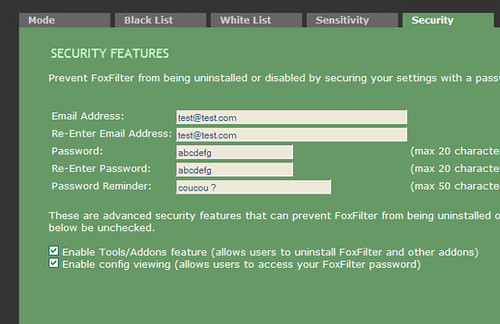
    In order to prevent FoxFilter from being disabled or removed, the security tab allows you to customize your security settings.

Read More


'iPhone' Nano Finally Here But... in China!

Posted by jcargoo | Monday, January 5, 2009
| 0Delicious Twitter Reddit Digg Loading...

Another cheap rubbish Chinese product comes to disquiet the MacWorld 2009 event. This is of course a fake of the apple's long-awaited miniature version of the iPhone. It combines 3G functionality with an iPod Nano. No enough

time for those stealers who gave rise to this stuff to wait until that Apple offers for sale its iPhone Nano –the thing which is absolutely hearsay before now.


As you can see from the picture, Mini-iPhone ($102.76) is just a miniature version of the legitimate big brother. Fake iPhone manufacturers in China have actually started selling iPhone Nanos in Thailand market.
Mini-iPhone has two SIM card slots, Bluetooth A2DP as well as a VGA camera (technical details).
iPhone Nano untill now is still under speculation, but if the real iPhone nano will not come, it’ll be really hard time for those Chinese swindlers to push simple people to lap up these clones.
Read More


Al Jazeera's Gaza Channel on Twitter

Posted by jcargoo | Sunday, January 4, 2009
| 0Delicious Twitter Reddit Digg Loading...

I really wanted to start this 2009 year by sharing with you a great twitter account to follow which is: AJGaza.
I’d have liked to start a happy year as normally everyone wishes me to do. But seemingly things do not happen like I want. Israel continues intensifying assault on Gaza

and Hundreds of Palestine’s civilians have been killed until now , four Israeli civilians killed and 2,450 injured so far.


So you can stay up to date with all the latest developments on the violence in and around the Gaza Strip with Al Jazeera's Gaza channel on Twitter.
After all I wish you all a happy new year.
Read More


Use Friendbar to Easily Keep in Touch

Posted by jcargoo | Wednesday, December 31, 2008
| 0Delicious Twitter Reddit Digg Loading...

Keep in touch with friends on the Web easily; I think this is everyone’s purpose. Friendbar connects all Twitter add-ons and your Facebook add-ons all in one.
Friendbar displays a running stream of texts and photos updates from Facebook and Twitter right on the toolbar allowing you to post your updates and reply from the toolbar itself.


All its features are explained in add-on page here.
This tool then will reduce people’s time spent on managing their friends from one Website to another. Friendbar add-on is still on experimental phase. I expect that the add-on will support other social networks. So more updates will surely come.
Read More


Convert Gmail Email To A Google Docs Document in One Sec

| 0Delicious Twitter Reddit Digg Loading...

Sometimes when I receive an email, I need to share the email content in a kind of a document with my peers.
Of course there is a classic method to do so which is simply to copy and paste the email content into a word document. But how about if the content holds plenty messages? It will be

probably a big pain to follow.


Gmail Labs offers a slick widget that lets you to convert any email conversation to text document.
The feature is too easy to activate. Just go to the “Settings/Labs” and click on “enable” of “Create a Document” widget. Then you can save your settings. Your Gmail user interface will be restarted to refresh your update.


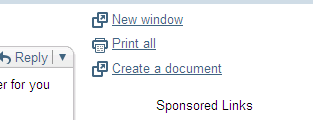
As soon as you open an email, on the right hand side of the page, you should see this link “Create a document” like so.


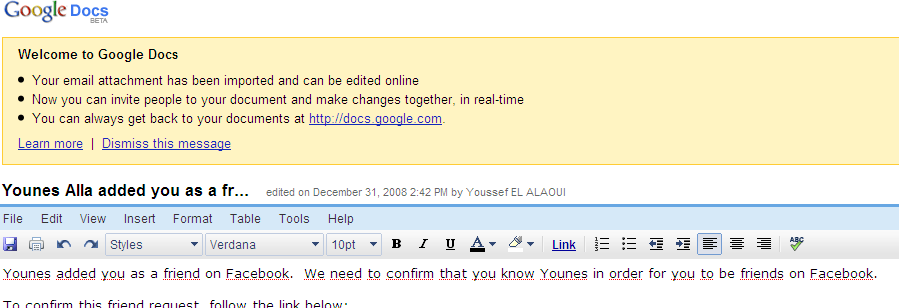
If you click on “Create a document” link you will see that the full text of your email will be transferred to a new Google Docs document.


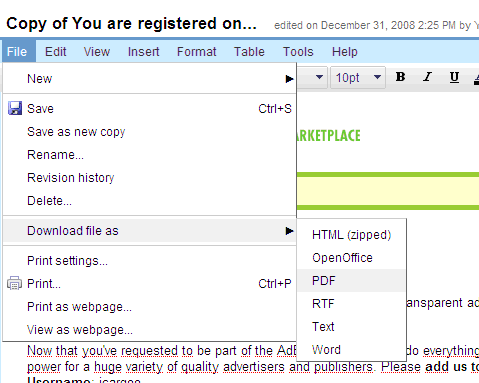
The text document you get can for example be downloaded or saved in your PC in different formats.


Now you can do whatever you want with this new document (share/modify/save/convert to another format….). I personally find this feature useful.

Read More


Google Updates The Toolbar PageRank

| 0Delicious Twitter Reddit Digg Loading...

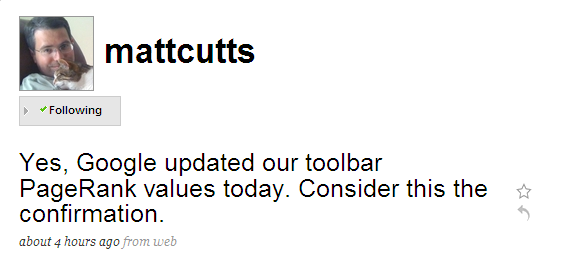
Matt Cutts in his twitter has confirmed that Google has updated the PageRank values today embedded in the Google Toolbar.
Just a small information to know is that the PageRank displayed on Google Toolbar displays sometimes an outdated number

. This information was confirmed by Vanessa Fox who said that Google maintains two different PageRanks. The first one is an internal one which is computed regularly. Whereas the second one that you see on Google toolbars is the external PageRank which is updated infrequently.


Read More


How to Add Your Website to Firefox's Search Bar With OpenSearch XML?

Posted by jcargoo | Tuesday, December 30, 2008
| 0Delicious Twitter Reddit Digg Loading...

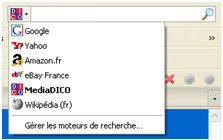
I always believed that the search right from your browser’s address toolbar is very helpful especially when you have the ability to customize (to add/remove) the list of the present websites in order to be able to have other(s) than the ones existing by default. But how about creating your OWN website search feature in the browser among others (Wikipedia, Amazon…) which will allow users to search directly on your site? I mean like so:


This is possible thanks to the OpenSearch XML. Let’s first create our XML file which is very simple to understand and to customize (its name will be opensearch.xml):

XML
<?xml version="1.0" encoding="UTF-8"?>
<OpenSearchDescription xmlns="http://a9.com/-/spec/opensearch/1.1/">
<ShortName>jCargoo Search</ShortName>
<LongName>Youssef ELALAOUI Blog Search</LongName>
<Description>Search what you want in the jCargoo's Blog articles</Description>
<InputEncoding>UTF-8</InputEncoding>
<OutputEncoding>UTF-8</OutputEncoding>
<AdultContent>false</AdultContent>
<Language>en-us</Language>
<Developer>Youssef ELALAOUI</Developer>
<Contact>youssef.elalaoui@jcargoo.org</Contact>
<Description>Search for IT and programming topics like Browser, Add-ons, jQuery, Firefox, Lucene and so on!</Description>
<Tags>youssef elalaoui php css html jquery apache mysql mootools javascript programming struts struts2 ajax google symfony twitter</Tags>
<Attribution>Search data from Youssef ELALAOUI, http://jcargoo.org</Attribution>
<SyndicationRight>open</SyndicationRight>
<Query role="example" searchTerms="Morocco"/>
<Image height="16" width="16" type="image/x-icon">http://www.imageous.net/files/maarhh727hrda6tsnmzb.ico</Image>
<Url type="text/html" template="http://www.jcargoo.org/search?q={searchTerms}"/>
</OpenSearchDescription>
XHTML
Add the following line to the header in order to allow each browser to know that I have an Open Search document available:
<link rel="search" type="application/opensearchdescription+xml" href="http://jcargoo.i8.com/opensearch.xml" title="jCargoo Blog Search" />
Now you can notice that Firefox for example is showing a link that says “Add jCargoo Blog Search” in the browser’s search engine list. If you click on this link, you will be able to see your site whthin the browser with your favicon.

That’s it.


Read More


How To Decode Any Short URL?

| 0Delicious Twitter Reddit Digg Loading...

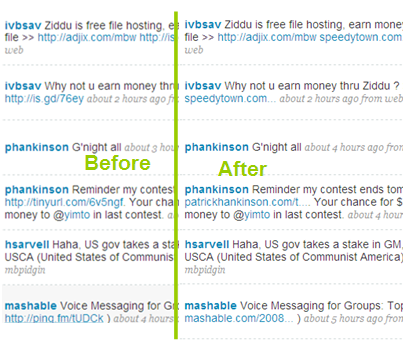
When I use my twitter, I need sometimes to know where the displayed links will lead me to. As you know, those links are encoded with services like: tinyurl, is.gd and so on.
So with some Firefox plugins like Long URL and Long URL Please you will be able to decode those links in order to

know where those shortened links really point to.

Long URL
Shows the real website link in a small tooltip when you hover over the shortened link.


Long URL Please
Replaces short urls with the originals so you can see where links actually link to.


You can also use the bookmarklet from Longurlplease to use this service.
The decoding of the shortened links is useful too if you face some people disguising links to yucky websites.

Read More


How Web 2 are you?

Posted by jcargoo | Sunday, December 28, 2008
| 0Delicious Twitter Reddit Digg Loading...

Do you know all of the brands of the Web 2.0? Quizible has presented a quiz where you have to recognize the logos of a variety of Web 2.0 services. I was able to get 29/34 so how about you?

You can register

and save your answers if you would like to return to the quiz later to complete it.


Read More


New Look for JCargoo’s Weblog (2)

| 0Delicious Twitter Reddit Digg Loading...

As I have mentioned in my previous post, the current site is still going through a deep redesign. Meanwhile, I believe that

this second beta version will not be so much different from the upcoming stable one.
This current version comes with new colors, new design, new favicon, and new logo (designed with Gimp).
I don’t like to talk so much about our Weblog as I know that the last word belongs to our readers and our visitors.
Enjoy!

Read More


Krunchd: A Very Cool URL Shortener

Posted by jcargoo | Wednesday, December 24, 2008
| 0Delicious Twitter Reddit Digg Loading...

Do you like URL shortening services (check post here)? With this kind of services, you are usually allowed to shorten only one URL. Now we have got a new one called Krunchd which provides a great feature allowing you to crunch an entire list of

URLs into one short URL!
Example: Let's say I want to share a list of my favorite Web Design URLs:


What make Krunchd special is how many URLs it allows you to shorten at once.
When you are preparing to generate your link with Krunchd you will notice that it merits sometimes to give your Email address if you would prefer update your list later.
That said, if the next time you have a list of URLs that you like to share, it may be worth to give Krunchd a try.

Read More


Great Free Twitter Buttons

Posted by jcargoo | Friday, December 19, 2008
| 0Delicious Twitter Reddit Digg Loading...

To encourage people to follow you on Twitter, you will find in this post a great set of some free graphics to put on your blog.
Of course there are some Official Twitter Badges available

but how about doing something a little bit nice and different?


You need of course to place the image on your site and link it to your Twitter profile. The set of graphics contains PNG and GIF images (but not for all images).

Enjoy!


Download Here


Read More


Firefox 3.1: HTML Source Viewer Gets Better

Posted by jcargoo | Wednesday, December 17, 2008
| 0Delicious Twitter Reddit Digg Loading...

Mozilla has enhanced the HTML source viewer in Firefox 3.1 exactly as it was developed in Chrome so web developers can now check easily all linked elements like CSS files, JavaScript files…As you can notice in the following screenshot

, all links embedded in the HTML code are now converted to live links.


Read More