How to Use PHP and jQuery to Create a Submit News Form

Posted by jcargoo | Tuesday, November 17, 2009
, | 0Delicious Twitter Reddit Digg Loading...

At some point you may need to have a submit news application in your website. I will not talk about the advantage of creating of such functionality. However, the purpose of this tutorial is to show you how you can create a smart submit news feature.


If you wish have a complete submit news application with all the features you need inside (captcha, more security, send email confirmation, tooltips, flag moderation for admin…), please get in touch with me and I will help you to perform that.

Scenario

You have a form you have to fill out. Every element has a special condition to be verified before being inserted in the database.
As soon as all defined conditions are validated, all information will be stored in a dedicated SQL. The stored segment table will contain then all the required article elements. All this will be performed thanks to AJAX.
Here's the sequence of events that will take place here:
  • The page shows the HTML form;
  • User fills out properly every form field and submits his article information;
  • An AJAX request will fire;
  • The filled data will be first validated and after stored in the database;
  • Once the insert step has been successfully done, a confirmation message will be displayed to the user;
  • All these steps will be done in a slick display;
  • Even when JavaScript is disabled, the article submission should work normally (but without animation effects).
Do you want to have a look of course?

Getting Started

We are going to need the jQuery library, jQuery Color plugin. We will also be using some CSS, PHP and a MySQL database to store our data.

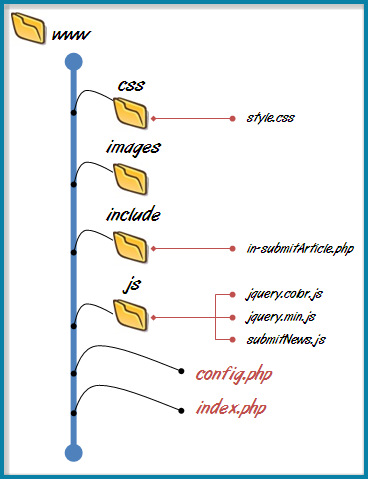
Here a detailed structure of the web application we are going to build:


HTML and CSS

The structure of the form will be as follows:

<div id="container">
<form id="form" action="index.php" method="post">
<div class="info">Submit your Article here</div>
<p>
<label for="name">Name</label>
<input type="text" name="name" id="name" />
</p>
<p>
<label for="email">Email</label>
<input type="text" name="email" id="email"/>
</p>
<p>
<label for="url">Post URL</label>
<input type="text" name="url" id="url" value="http://"/>
</p>
<p>
<label for="description">Description</label>
<textarea name="description" id="description" ></textarea>
</p>
<input name="submit" type="submit" id="submit" class="submit" value="Submit">
</form>
</div>

For the CSS, I believe that it will be pointless to show the whole CSS. So let’s talk about the most important CSS classes:

#form .error {
text-align:center;
border:solid 1px #CC0000;
background:#F7CBCA url(../images/error.png) 3px 2px no-repeat;
color:#CC0000;
font-weight:bold;
padding:4px;
margin:10px;
-moz-border-radius: 5px;
-webkit-border-radius: 5px;
}
#container .result {
text-align:center;
-moz-border-radius: 5px;
-webkit-border-radius: 5px;
border:solid 1px #90ac13;
background:#eef4d3 url(../images/ok.png) 3px 3px no-repeat;
color:#6b800d;
font-weight:bold;
padding:4px;
margin:10px;
}
.overlay {
position: absolute;
-moz-border-radius: 3px;
-webkit-border-radius: 3px;
width: 100%;
height: 100%;
background: #888888 url(../images/ajax-loader.gif) no-repeat 50% 50%;
left: 0;
top: 0;
display: none;
opacity: .9;
}

  • “error” class is supposed to be shown when the form fields are not correctly set;
  • “result" class will be used when we will confirm to the user that his article is under moderation (stored in the database);
  • “overlay” class will be activated when the AJAX call will be fired. This class will be applied in the form area with a loading progress image;
  • The whole CSS code is easy to assimilate. All is about to make beautiful our form layout.
Javascript

First, we have to call our JavaScript library and plugin to use as well as submitNews.js, a custom build which includes our JavaScript code.

<script src="./js/jquery.min.js" type="text/javascript"></script>
<script src="./js/jquery.color.js" type="text/javascript"></script>
<script src="./js/submitNews.js" type="text/javascript"></script>

The first code snippet is merely used to make a kind of special input and textarea elements by changing their background color when they receive focus/blur.
“:input” is used to match all input and textarea.

$(':input').focus(function() {
$(this).css('background-color', '#EFF5FF');
});
$(':input').blur(function() {
$(this).css('background-color', '#fff');
});

Now let’s have a look at the core of our AJAX. I will past the code here and after relate a couple of things step by step:

$('#submit').click(function(){


var name = $('#name').val().replace(/[^\d\w ]+/ig,'');
var email = $('#email').val().match(/^([a-zA-Z0-9_\-\.]+)@[a-z0-9-]+(\.[a-z0-9-]+)*(\.[a-z]{2,3})$/i) ? $('#email').val() : null;
var url = $('#url').val().match(/^(https?:\/\/)?([\da-z\.-]+)\.([a-z\.]{2,6})([\/\w \.-]*)*\/?$/) ? $('#url').val() : null;
var description = $('#description').val();

if (name.length <4 email == null url == null description.length < 4){
if ($('.error').length == 0){
$('form .info').fadeOut(200).attr("class", "error").hide().html('Please fill out each field correctly!').fadeIn(1000);
}
else{
$('.error').stop().animate({
backgroundColor : "#CC0000"
}, {
duration : 200,
complete : function() {
$(this).animate( {
backgroundColor : "#F7CBCA"
}, 600);
}
});
}

return false;
}

$.post(
'./include/in-submitArticle.php', {
'name' : name,
'email': email,
'url': url,
'description': description
},

function(r){
$('.error').fadeOut(200);
$('<div class="overlay"></div>')
.appendTo('#form')
.fadeIn(1000, function(){
$('#form')
.slideUp(800,function(){
$('#container').append('<div class="result">'+r+'</div>')
.hide()
.fadeIn(1000);
});

});


}

);

return false;// disable submit click

});

  • Once the submit button is clicked, we first pick up values filled out by user and perform some checks using regular expression method (here some details about the regular expressions used in this code: here and here);
  • We set up some conditions to check if every filled field’s value is valid or not;
  • If the defined conditions are not respected, we apply the “error” class instead of the “info” class;
  • And if the “error” class is already existing, we just animate its background to draw the attention of the user;
Now for some AJAX:

“post” function will load a remote page using an HTTP POST request.

  • The URL specified points to in-submitArticle.php;
  • in-submitArticle.php is the PHP script responsible of storing the filled article information in the database;
  • This PHP script will run on the server side with key/value sent to this server. This means that the PHP script will use these parameter values in order to be executed. I will make more comprehensible the role of this script in the right section below;
  • Before the data will be loaded successfully from the server (from in-submitArticle.php), the bundled function defined inside the post function will apply the “overlay” class (loading image inside the form section) before showing the result of article insertion with an animated show.

This is all what I can say about the main JavaScript code.

SQL

We create a database named ‘ajaxnews' and a table inside which contains all fields we need to store:
Database: ' ajaxnews'

CREATE TABLE IF NOT EXISTS `articles` (
`id` int(11) NOT NULL AUTO_INCREMENT,
`name` varchar(200) NOT NULL,
`email` varchar(200) NOT NULL,
`url` varchar(400) DEFAULT NULL,
`description` varchar(1000) DEFAULT NULL,
PRIMARY KEY (`id`)
) ENGINE=MyISAM DEFAULT CHARSET=latin1;

PHP

Let’s get to data handling posted thanks to jQuery. I will start with config.php.
This file contains the connection settings that you should customize for your own parameters:

<?php

$server = 'localhost';
$username='root';
$password='';
$db = 'ajaxnews';

define('IS_AJAX', isset($_SERVER['HTTP_X_REQUESTED_WITH']));
?>

IS_AJAX constant will help to know if AJAX request is taking place or not. This is the need to use “isset” function.

in-submitArticle.php

<?php

require 'c:\wamp\www\loginForm\config.php';

if(IS_AJAX) {
$post['name'] = trim($_POST['name']);
$post['email'] = trim($_POST['email']);
$post['url'] = trim($_POST['url']);
$post['description'] = trim($_POST['description']);
}

$mysqli = new mysqli($server, $username, $password, $db) or die('There is a problem in the connection [mysqli]');

$stmt = $mysqli->stmt_init();

if($stmt = $mysqli->prepare("INSERT INTO articles VALUES (NULL,?,?,?,?)")){

$stmt->bind_param('ssss', $post['name'], $post['email'], $post['url'], $post['description']);

if(!$stmt->execute()) die($mysqli->error);

$stmt->close();

$mysqli->close();


echo "Hey " .$post['name']. ", Thanks for Submitting!";


}

else{
echo "Problem occurred at insert step!";
}
?>

  • First, we require the config.php file because we will use all the variables we defined inside;
  • After that, we will check if AJAX is activated. If yes, the array “post” will contain all the trimmed values of the HTML form;
  • The rest is pretty simple to follow as it is regarding the standard method of connection to a database as well as the insertion using SQL language;
Now what about if JavaScript is disabled?

If you remember, the HTML form action points to index.php. The index.php script is in the following snippet:

<?php
if(isset($_POST['submit'])){
$post = array();
$error = false;
foreach($_POST as $key=>$value){
if(isset($_POST[$key]) && strlen(trim($_POST[$key]))>=4){
$post[$key] = trim($value);
}
else $error = true;

if ($key === 'email'){
if(!filter_var($value, FILTER_VALIDATE_EMAIL)) $error =true;
}

if ($key ==='url'){
if(!filter_var($value, FILTER_VALIDATE_URL)) $error =true;
}

}

if(!$error){
require './include/in-submitArticle.php';
}
else{
echo "Please fill out correctly the fields!";
}
}
?>

Here too we check if the submit button has been clicked. We also execute some verification regarding the length of the filled values and the validation of the email address and the URL using filers: FILTER_VALIDATE_EMAIL and FILTER_VALIDATE_URL.
I cannot guarantee that the filters will do the same work as the regular expressions we set up in the JavaScript code. FILTER_VALIDATE_EMAIL knows some bugs but you can use it with no worries as I continue to use it with no kind of problems.

Of course there are other ways to achieve this functionality, but keep in mind that the purpose of this tutorial is to talk easily about AJAX and PHP.

This application has been tested successfully in all famous browsers.

Thanks for reading and please feel free to ask.


Tools used to develop this application
Read also:
Read More


10 Horizontal Menus with jQuery Effects

Posted by jcargoo | Saturday, November 7, 2009
| 0Delicious Twitter Reddit Digg Loading...


Well this is a roundup of some simple horizontal menus I have developed with jQuery.
They are all free to use. You can customize the code as you like. Every menu shows a different manner to present the user interaction.


jQuery comes to make all these menus more unique and special.
Please do not hesitate to add any kind of remark to improve this work.
All menus have been successfully tested in Firefox3.5.5, IE8, Chrome 3.0.195.27 and Safari 4.0.3.
One more thing to mention is that all these menus need to be slightly improved to be full developed CSS menus.
Let's have a try?


Rounded corner (not in IE) background follows any menu link you move the mouse on it with an elastic effect.


The lightning image moves over the menu link with elastic effect.

Spice your menu with random colors when hovering.


A professional menu to add more significance to your menu.

One another elastic effect.

Give your bottom border another animation.

A colored vertical line is shown inside every menu item when hovering.

Every menu item grows when you put the mouse on.

Detailed menu content.


Every menu item has its own defined color.

Here is a code snippet for the first menu:

$('.hoverMenu1').css("left", $('.current1').offset().left).css(
"width",
parseFloat($('.current1').width(), 10)
- parseFloat($('.hoverMenu1').css("padding-left"), 10)
* 2);
$('#bar1 li a').hover(
function() {
var offset = $(this).offset();
$('.hoverMenu1').stop().animate( {
left : offset.left,
width : $(this).width()
}, 1000, 'easeOutElastic');
},
function() {
$('.hoverMenu1').stop().animate(
{
left : $('.current1').offset().left,
width : parseFloat($('.current1').width(), 10)
- parseFloat($('.hoverMenu1').css(
"padding-left"), 10) * 2
}, 600, 'easeOutBounce');
});


jQuery plugins used : jquery.easing.1.3.js and jquery.color.js.

Read also :
7 Vertical Menus With jQuery Effects

Read More


Friday Post: Programming, Blogging and Freelancing Best Selection

Posted by jcargoo | Friday, August 14, 2009
| 0Delicious Twitter Reddit Digg Loading...

Before to reveal my best articles I have read this week, I would like first to talk concisely about some events which left their mark on me. As usual some important things happen this week. People talked about the event day of the Apple Tablet announcement and its launch date (September 7th) or till 2010.

Social media news bloggers were interested on Facebook acquirement of FriendFeed, Facebook Paid Nearly $50 Million for FriendFeed to update his status to "Married". Again we talked about the cyberattacks that twitter was subjected to. The Zune HD’s launch date (September 15th) announced by Microsoft. YouTube homepage gets finally an unnecessary redesign. Better sharing features added to Google reader so you can finally share your RSS items with your favorite social websites. Google talked about the next-generation architecture for Google's web search. This new search engine version is called Google Cafeine.
Google unveiled also the new "Social Gadgets" for its iGoogle site. This new detail lets some observers to say that iGoogle is transformed to a social network and might be the start of Facebook real problems(...)
There are so many other events to talk about. However, the aim of my Friday Post is merely to share with you my best posts selection of this week.
This following posts roundup remains varied.

Programming

Review of eight regular expressions that you should know for your next coding project. The article is well explained. The comments too.

Jeffrey Way, the editor of Nettuts+ posted fifteen video tutorials that teach you how to use the jQuery library. Neat screencasts, clear explanation, and several IDE, browsers and tricks used to teach you how to use the jQuery library in your projects.

Blogging

Some tips for creating the best blog you can, and doing so with the resources you already have. Interesting article about how to make a convenient strategy for your blog.

The post is somehow old but the content still remains relevant and will be always so in the future. Simple beginners’ points are discussed with a clear method.

Darren Rowse presents a few tips that should help bloggers get the best results out of any affiliate program that they choose to run with. The revealed method will not surely work right for every blogger. Because all of us have already had at least one time (or more) affiliate program bad experimentation (in terms of revenue streams).

Om Malik talks with a sharp insight (as per usual) about the current and the next generation of blogging systems and their needs to be associated with agile resources. The article is not technical but the future idea presented is interesting.

All is about keywords. What are the means that help you to have good search rankings because of SEO and trackbacks? This was the idea behind this article. However, the article does not give a neat comparative review of those search tools with advantages and disadvantages.


Freelancing

Very good article which unveil some of the most important tips and aspects of freelancing and the lifestyle that comes with it. The only thing which was not deeply discussed is the customer aspect.

Small post but rich article. It focuses on this important step of taking the risk.

This post gathers 5 great articles showing the most important freelance elements in terms of business, security, resources and other amazing tips related to freelance field.

Harness the power of partnering is the main subject of this nice article. Only examples are given to show how the partnering has its significant weight to fulfi your task.

What about you? I need your suggestions and ideas.

Have a wonderful weekend!
Read More


5 Very Useful Resources for MooTools Developers

Posted by jcargoo | Thursday, August 13, 2009
| 0Delicious Twitter Reddit Digg Loading...

MooTools is a compact, modular, Object-Oriented JavaScript framework designed for the intermediate to advanced JavaScript developer. It allows you to write powerful, flexible, and cross-browser code with its elegant, well documented, and coherent API. There are several sites and famous applications using MooTools.

Here are 5 useful resources that I recommend to read and check for developers programming with MooTools.


jQuery vs MooTools
Picking a library to use, this is the main point of several people starting to code in JavaScript. This article gives an informative and useful clue to help choosing between jQuery and MooTools frameworks. The author tried to keep as unbiased as possible.


41 of the Best MooTools Ajax Example Downloads
This is merely the best MooTools examples scrupulously gathered by Speckyboy Design Magazine. The list includes several good examples for beginners and advanced MooTools developers (Slideshow, login form, sortable table, rounded corners...)


Twitter Emulation Using MooTools 1.2 and PHP
Using PHP, MySQL, and MooTools javascript, David Walsh provides a basic Twitter-like status system. MooTools is used to create subtle animations and Ajax requests.


TextboxList
TextboxList turns normal textboxes into a widget which can be navigated with the keyboard, effectively turning your input into a “list” of items that can be easily deleted. It comes with an Autocomplete plugin.


11 Ways to Enhance a User Interface with MooTools
Interactivity, subtle effects and jazzing up your UI forms; there are the 3 main reasons behind writing a great article like this which presents 11 clear tutorials talking about MooTools.


For any idea or suggestion, please leave a comment.

Read also :
The 17 Most Widely Used JavaScript Frameworks
Read More


Overlay Text over an Image with a Very Simple jQuery Snippet

Posted by jcargoo | Monday, August 10, 2009
, | 0Delicious Twitter Reddit Digg Loading...

This post will show you how much jQuery is helpful to give a trendy face of the presentation of your images.
There are some developers who want only to put fixed text messages above the images. But there are others who like to add some spices to their images look.


This code which I will show you has been developed to be clear and simple as much as possible.


The main idea behind consists to let user get the comment (or explanation) of the image he is hovering. This comment will appear when the user hover over the image, and will disappear when the mouse is out of the image.

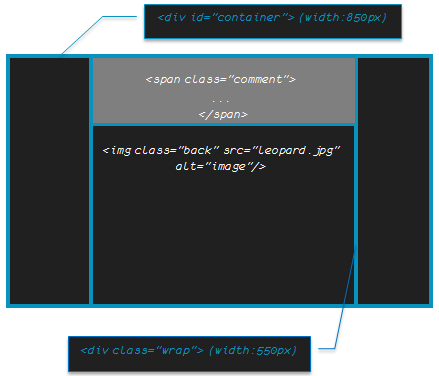
So here I go. Our schematic will be like following:


Then the HTML code is:


<div id="container">
<div class="wrap">
<img class="back" src="leopard.jpg" alt="image"/>

<span class="comment">
Apple - Mac OS X Snow Leopard <br/> The world's most advanced OS
</span>
</div>
</div>

Note that the width/height of the wrap div is the same as those of the image.

The CSS is also simple to understand:

#container {
width: 850px;
text-align: center;
margin: auto;
}

.back
{
position:absolute;
top:0;left:0;
}
.wrap
{
width:550px;
height:390px;
position:relative;
margin:auto;
overflow:hidden;
}

.comment
{
position:absolute;
width:550px;
top:400px;
left:0px;
letter-spacing: -1px;
color: white; font: 24px/45px Berlin Sans FB, Sans-Serif;
background: #4A4D4A;
padding: 10px;
filter:alpha(opacity=60);
-moz-opacity:0.6;
-khtml-opacity: 0.6;
opacity: 0.6;
line-height: 90%
}

  • The image class as well as the comment class should have absolute position in order to have the comment to be stuck on the image. Thus, the wrap class should be defined with relative position;
  • The overflow should be set to hidden for wrap class. This is done to hide the comment when it goes back;
  • There are the only important things to talk about. Otherwise, the rest of the parameters is clear to devour.

Finally, let’s talk about jQuery code. This code is a way to fulfill our task which is spicing our image look.


$(function(){

$('.wrap').hover(function(){
$(this).children('.comment').stop().css("top", "0px");}

, function(){
$(this).children('.comment').stop().animate({"top": '400px'}, 600);});

});


We used hover jQuery event. The top value of the comment was 400px, which means that it was out of our eyesight. Now jQuery helps us to resotre it (set the top value to 0). Since the mouse is out of the image, the second function is fired with some animation thanks to jQuery effect.

For any kind of suggestion, please don’t hesitate.


Tested successfully in Safari, FF, IE and Chrome (last versions)
Read More


The 17 Most Widely Used JavaScript Frameworks

Posted by jcargoo | Wednesday, August 5, 2009
| 0Delicious Twitter Reddit Digg Loading...

This is one of several points of entry found on the web in which some information about JavaScript frameworks are gathered.
The emergence of some recent JavaScript frameworks and libraries contributed widely to fine down a heavy volume of complex developers tasks.
Before to settle on a framework, the developer should know what are

the existing alternatives. This following list helps to give a pithy overview of the most used JavaScript frameworks. Note that this list contains also some excellent frameworks that are lacking only some popularity.
The purpose of the article is not to give the list of all JavaScript frameworks -because there are hundreds of Ajax/JavaScript frameworks available. But as I said, it is always good to know what the strongest choices do you have are.


jQuery is a fast and concise JavaScript Library that simplifies HTML document traversing, event handling, animating, and Ajax interactions for rapid web development. jQuery is designed to change the way that you write JavaScript.

MIT and GPL licenses.

Details
IE 6.0+, FF 2+, Safari 3.0+, Opera 9.0+, Chrome
Supports CSS 1-3 selectors and more!
About 19KB in size (Minified and Gzipped)

Documentation
http://docs.jquery.com/Main_Page

Books
jQuery in Action, Learning jQuery.

Plugins
http://plugins.jquery.com/

UI example


Get started with some tutorials here.


Prototype is a JavaScript Framework that aims to ease development of dynamic web applications.
Featuring a unique, easy-to-use toolkit for class-driven development and the nicest Ajax library around, Prototype is quickly becoming the codebase of choice for web application developers everywhere.

MIT (source code) and CC BY-SA (documentation) licences.

Details
IE 6.0+, FF 1.5+, Safari 2.0+, Opera 9.25+
More about Prototype and CSS3 is here.
About 128KB in size

Documentation
http://www.prototypejs.org/api

Books
Prototype and Scriptaculous in Action, Practical Prototype and script.aculo.us.

UI example


Get started with some tutorials here.


script.aculo.us is a set of JavaScript libraries to enhance the user interface of web sites. It provides a visual effects engine, a drag and drop library (including sortable lists), a couple of controls (Ajax-based autocompletion, in-place editing, sliders) and more.
script.aculo.us includes the Prototype JavaScript Framework.

MIT license.


Details
IE 6.0+, FF 1.5+, Safari 2.0+, Opera 9.25+
About 141KB in size

Documentation
http://wiki.github.com/madrobby/scriptaculous

Books
Prototype and script.aculo.us, Practical Prototype and script.aculo.us.

UI example


Get started with some tutorials here.


MooTools is a compact, modular, Object-Oriented JavaScript framework designed for the intermediate to advanced JavaScript developer. It allows you to write powerful, flexible, and cross-browser code with its elegant, well documented, and coherent API.

MIT license.

Details
Safari 2+, IE 6+, FF 2+ (and browsers based on gecko), Opera 9+.
About 65 kb in size (YUI Compressor)

Documentation
http://mootools.net/docs/core

Books
The Definitive Guide to MooTools, Professional JavaScript Frameworks: Prototype,YUI, ExtJS, Dojo and MooTools.

UI example


Get started with some tutorials here.


The Dojo Toolkit is an open-source JavaScript toolkit useful for building great web applications. It is lightning fast, extremely robust, and supplies a solid set of tools for DOM manipulation, animations, Ajax, event and keyboard normalization, internationalization (i18n) and accessibility (a11y).

BSD or the Academic Free License version 2.1 licenses.

Details
IE 6+, Firefox 1.5+, FF 3.5 (1.3.2 only) (Dijit supports only FF 2+), Safari 3.2, Safari 4.0 (1.3.2 only), Chrome 1.0, Chrome 2.0 (1.3.2 only), Opera 9.6 (Dojo Core only), Konqueror 3.5+ (Dojo Core only)
About 28K (gzipped)

Documentation
http://dojotoolkit.org/docs, http://docs.dojocampus.org/

Books
Dojo: The Definitive Guide, JavaScript and Ajax Tools for Great Web Experiences (Pragmatic Programmers), Learning Dojo, Practical Dojo Projects.

UI example


Get started with some tutorials here.


The YUI Library is a set of utilities and controls, written in JavaScript, for building richly interactive web applications using techniques such as DOM scripting, DHTML and AJAX

BSD license

Details


A-grade
A-grade support is the highest support level. By taking full advantage of the powerful capabilities of modern web standards, the A-grade experience provides advanced functionality and visual fidelity.
A-grade browsers are identified on a whitelist. Approximately 96% of our audience enjoys an A-grade experience.
Summary: A-grade browsers are identified, capable, modern and common. QA tests all A-grade browsers, and bugs are addressed with high priority.


About 11.6 MB (zipped)

Documentation
http://developer.yahoo.com/yui/yuidoc/

Books
Learning the Yahoo! User Interface library.

UI example


Get started with some tutorials here.


ASP.NET AJAX is the free Microsoft AJAX framework for building highly interactive and responsive web applications that work across all popular browsers. The ASP.NET AJAX framework includes Server-Side ASP.NET AJAX, Client-Side ASP.NET AJAX, the AJAX Control Toolkit, and the jQuery library. ASP.NET AJAX enables developers to choose their preferred method of AJAX development, whether it is server-side programming, client-side programming, or a combination of both.

Microsoft Permissive License (Ms-PL).

Details
IE 6.0+, FF 1.5+, Safari 2.0+, Opera 9.25+
About 330KB in size (zipped)

Documentation
http://www.asp.net/ajax/documentation/

Books
Programming ASP.NET AJAX, ASP.NET AJAX in Action, Pro Ajax and the .NET 2.0 Platform.

UI example


Get started with some tutorials here.


The Spry framework is Adobe’s Ajax framework that provides easy-to-use yet powerful Ajax functionality that allows designers to build pages that provide a richer experience for their users. It is designed to take the complexity out of Ajax and allow designers to easily create Web 2.0 pages. The Spry framework is a way to incorporate XML, JSON or HTML data into pages using HTML, CSS, and a minimal amount of JavaScript, without the need for refreshing the entire page.

BSD license.

Details
Firefox 1.5 +(Windows and Mac) • Netscape 7.2 (Windows) • Internet Explorer 6+ (Windows) • Safari 2.0.3 (Mac)
About 4.88 MB in size (zipped)

Documentation
http://labs.adobe.com/wiki/index.php/Spry

Books
The Essential Guide to Dreamweaver CS4 with CSS, Ajax, and PHP

UI example


Get started with some tutorials here.


MochiKit is a highly documented and well tested, suite of JavaScript libraries that will help you get shit done, fast. The team in charge took all the good ideas they could find from Python, Objective-C, etc. Experience and adapted it to the crazy world of JavaScript. JSAN and Dojo Toolkit are fully supported by and interoperable with MochiKit.

MIT, and the Academic Free License version 2.1 licenses.

Details
Safari 2.0.2, Firefox 1.0.7, Firefox 1.5b2, Internet Explorer 6, and Opera 8.5
About 460 KB in size (zipped)

Documentation
http://www.mochikit.com/doc/html/MochiKit/index.html

Books
Practical JavaScript, DOM Scripting and Ajax Projects

UI example


Get started with some tutorials here.

Ext JS is a cross-browser JavaScript library for building rich internet applications which includes customizable UI widgets and an intuitive, easy to use API.

Commercial License, GNU GPL license v3, or OEM / Reseller License. Please check here.

Details
Internet Explorer 6+, FireFox 1.5+ (PC, Mac), Safari 3+, Opera 9+ (PC, Mac).
About 156 KB in size.

Documentation
http://extjs.com/deploy/dev/docs/

Books
Learning Ext JS, Developing with Ext GWT.

UI example


Get started with some tutorials here.


Rialto (Rich Internet Application Toolkit) is ajax-based cross browser javascript widgets library. Because it is technology agnostic it can be encapsulated in JSP, JSF, .Net, Python or PHP graphic components. The purpose of Rialto is to ease the access to rich internet application development to corporate developers. Ideally a Rialto developer has neither need to write or understand DHTML, Ajax or DOM code.

Open source Apache License.

Details
Firefox 1.5 +, IE 6+ and Opera 9+
About 530 KB in size.

Documentation
http://rialto.improve-technologies.com/js/javascriptDocV1/summary.html

Books
JavaScript pour le Web 2.0 (fr)

UI example


Get started with some tutorials here and here also.


Archetype is a JavaScript Framework for JavaScript and Ajax application that enables developers to use JS for light to heavy clientside developments. It shares a lot of things in common with Prototype.

The Framework:
* takes care of all the application loading part and dependencies loading
* eases a lot OO Programming in JS
* is designed to fully work in MVC on the client side
* adds an easy to use template interface for the best JS template systems (JST, EJS, DOMTAL, Prototype, etc.)

MIT License

Details
Browsers: n/a
About 2.1 MiB (zipped).

Documentation
http://archetypejs.org/project-info.html

Books
n/a
UI example


Get started with some tutorials here.


UIZE (pronounced "you eyes") is a powerful, open source, object oriented JavaScript framework - supporting widgets, AJAX, DOM, templates, and more. You can call it an "Ajax Framework", an "Ajax Toolkit", a "JavaScript Framework", a "JavaScript API", a "JavaScript Toolkit", a "JavaScript Toolbox"...UIZE allows you to create more effective user interfaces in your Web-based applications and services.

GNU General Public License.

Details
Browsers: n/a
About 6.8 MB (zipped).

Documentation
http://www.uize.com/explainers/using-the-documentation.html

Books
n/a

UI example


Get started with some tutorials here.


Rico is an open source JavaScript library for developing rich Internet applications (RIAs) that use Ajax.[1]
Rico uses the Prototype Javascript Framework and JSON libraries.

Apache 2.0 License.

Details
Browsers: IE 5.5, IE 6, Firefox 1.0x/Win, Camino/Mac, Firefox 1.5x/Mac. Currently, the Drag And Drop is not supported on Safari and the Ajax API requires Safari 2.0.3
About 1.5 MiB (zipped).

Documentation
n/a

Books
Ajax Black Book

UI example


Get started with some tutorials here (1, 2)

moo.fx is a superlightweight, ultratiny, megasmall javascript effects library, to be used with prototype.js or the mootools framework.
It's very easy to use, blazing fast, cross-browser, standards compliant, provides controls to modify any CSS property of any HTML element, including colors, with builtin checks that won't let a user break the effect with multiple, crazy clicks. Optimized to make you write the lesser code possible, the new moo.fx is so modular you can create any kind of effect with it.

MIT License.

Details
Safari 2+, IE 6+, FF 2+ (and browsers based on gecko), Opera 9+.
About 3,2 KB.

Documentation
http://mootools.net/docs/core
Old: http://moofx.mad4milk.net/old/documentation/

Books
n/a

UI example


Get started with some tutorials here.

midori is an ultra-lightweight JavaScript framework that gets the job done without getting in your way.

MIT License.

Details
Internet Explorer 6+, Firefox 1.5+, Safari 2+, Opera 9+
About 45KB.

Documentation
http://www.midorijs.com/docs.html

Books
n/a

UI example


Get started with some tutorials here.


qooxdoo is a comprehensive and innovative framework for creating rich internet applications (RIAs). Leveraging object-oriented JavaScript allows developers to build impressive cross-browser applications. No HTML, CSS nor DOM knowledge is needed.

GNU Lesser General Public License (LGPL) and the Eclipse Public License (EPL).

Details
Microsoft Internet Explorer 5.5, 6 and 7, any Gecko-based browser with Gecko version 1.7 or higher. This includes Firefox 1.0, 1.5, 2.0 and any Mozilla Suite 1.3 or higher, Opera 8 or 9, Safari 3.0.
About 45KB.

Documentation
http://qooxdoo.org/documentation

Books
n/a
UI example


Get started with some tutorials here.

For any suggestion, please leave a comment.
Read More